On this page 7 sections
Your customer answers WhatsApp in seconds and email in about three days, if at all. So when the job is done, the invoice may as well go where they are already looking.
This guide covers what has to be on the invoice, three ways to send one on WhatsApp, and the one thing that makes the biggest difference to how quickly you get paid.
Is sending an invoice on WhatsApp allowed?
Yes. Nothing in UK law says how an invoice has to reach your customer. Post, email, WhatsApp, handed over on the doorstep: all fine. What matters is what the document says.
A valid invoice needs:
| What | Detail |
|---|---|
| The word “invoice” | So it is not mistaken for a quote or a receipt |
| A unique invoice number | Sequential, no gaps, no repeats |
| Your business name and address | Plus your company number if you are a limited company |
| Your customer’s name and address | The person or business who has to pay |
| The date | The invoice date, and the date of the work if it is different |
| A description of the work | Enough for them to recognise the job |
| The amount due | Clear, and broken down if there are separate parts |
| Payment terms | When it is due, and how to pay |
| Your VAT number and the VAT charged | Only if you are VAT registered, and then it is a legal requirement |
If you work under CIS, your invoice usually also shows your UTR, and if it is a reverse charge job it needs wording saying the contractor accounts for the VAT.
Three ways to send an invoice on WhatsApp
1. Make it elsewhere, attach the PDF
The way most trades do it. Build the invoice in a template or an invoicing app, export it as a PDF, then attach it in WhatsApp and send.
It works, and it costs nothing if you use a template. The catch is the faff: you are back at the van or at home with a laptop, filling in the same fields you filled in on the quote a fortnight ago, then remembering to export it as a PDF rather than sending the editable file.
2. WhatsApp Business
WhatsApp Business is free and worth having. You get a business name, opening hours, a catalogue and saved replies for the questions you answer twenty times a week.
What it does not do is make invoices. There is no WhatsApp Business invoice feature in the UK, and no built-in payments. You still make the invoice somewhere else and attach it. What you gain is that the message comes from a business profile rather than a personal number.
3. Send it from inside the chat with a bot
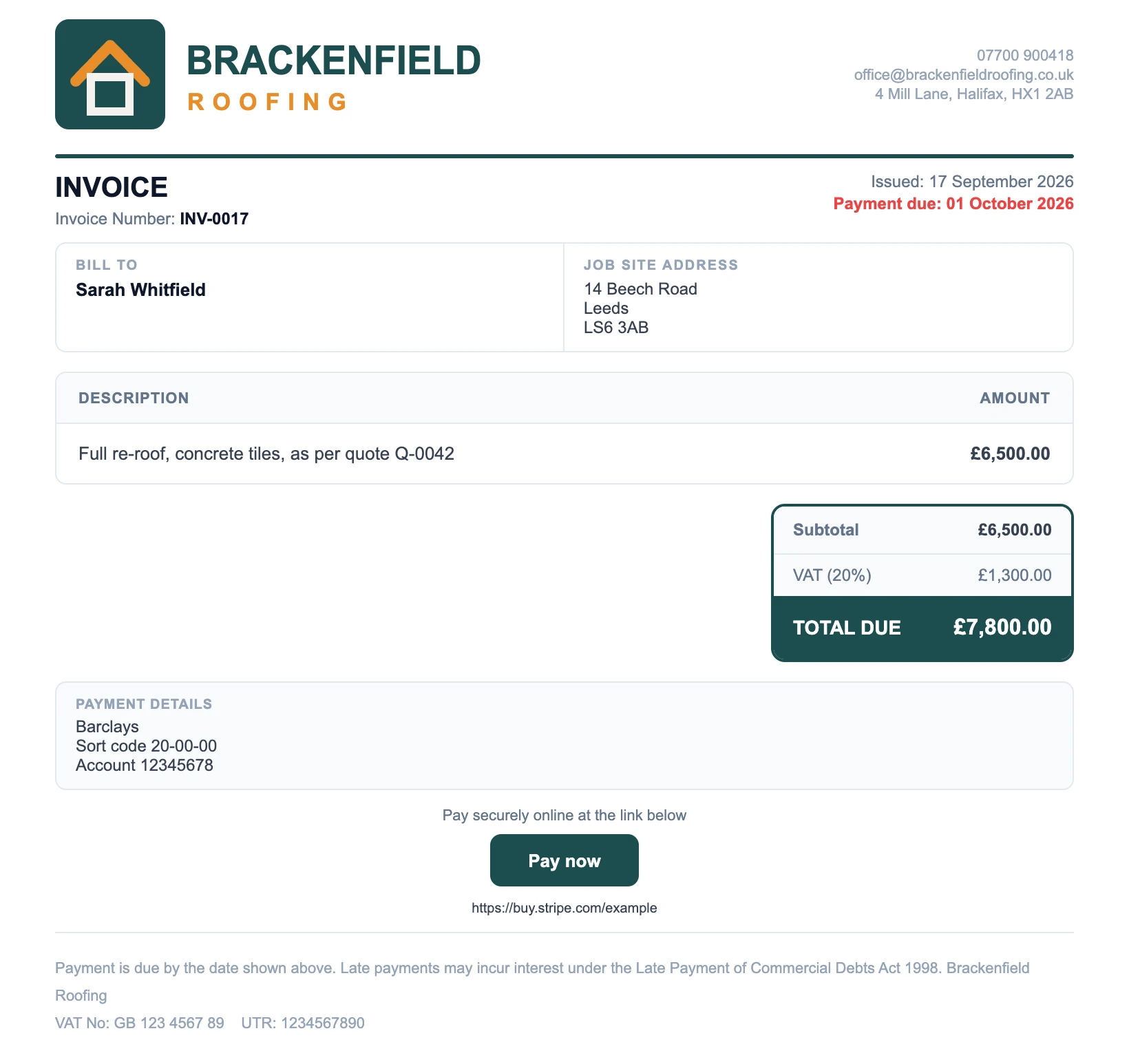
The newest option, and the reason this guide exists. A WhatsApp invoicing bot sits in your chat list like a contact. You tell it what to invoice, it builds the PDF and sends it back to you in the chat, and you forward it to your customer.
No app, no laptop, no template. This is what NorthBot does:
Invoicing from your phone in the van
-
Message NorthBot
"Invoice the Whitfield job".
-
It builds the invoice
From the quote you already sent.
-
Check the summary
Change anything by message.
-
Forward the PDF
Straight to your customer.
The one thing that gets you paid faster
Put a payment link on the invoice.
Bank details at the bottom of an invoice ask your customer to do work: open the banking app, add a new payee, type a sort code, wait for a security check, type the reference. Plenty of people intend to do all that and then do not.
A payment link is one tap. Stripe gives you one free, you set it up once, and it goes on every invoice after that. The customer taps Pay now, types their card in, and the money is on its way before they have put the phone down.
Writing the message that goes with it
The invoice does the work. The message just has to be short, polite and clear about what happens next.
Hi Sarah, thanks for having us in this week. Invoice attached for the re-roof, £7,800 including VAT, due in 14 days. You can pay by card using the button on the invoice, or by bank transfer if that is easier. Any questions just shout.
Three things to keep in it: the amount, the due date, and how to pay. Leave out apologies. You did the work, the bill is not an imposition.
Chasing an unpaid invoice on WhatsApp
WhatsApp is better for chasing than email, because you can see it has been read. Keep it friendly for the first two rounds.
| When | What to send |
|---|---|
| Due date | ”Morning Sarah, just a reminder the invoice for the re-roof is due today. Card link is on the invoice if that is easiest.” |
| A week late | ”Hi Sarah, has the invoice for the re-roof been missed? Happy to resend it if it has gone astray.” |
| Two weeks late | A formal reminder by email as well, referencing the invoice number and the date it was due |
If it goes further than that, you have the legal right to charge interest and a fixed recovery fee on late commercial payments, and a written record in the chat helps if it ever gets that far.
Common mistakes
- Repeating invoice numbers. Every invoice needs its own number, in order. Two invoices numbered 12 is the kind of thing that gets picked up in the worst possible year.
- Sending the editable file. Send the PDF, not the spreadsheet or the document. Anything editable invites arguments.
- No VAT number. If you are VAT registered it has to be on there. It is the single most common thing missing from trade invoices.
- Waiting until the weekend. Invoicing in batches on a Sunday night costs you days of payment terms on every job in the pile.
- No job description. “Work done, £3,000” gets queried. “Full re-roof, concrete tiles, 14 Beech Road” does not.
Do it from the van
The best invoicing routine is the one that happens before you have driven home. If your invoice can be sent from the driveway on your phone in a minute, it goes out the same day, every day, and the money comes in weeks earlier across a year.
NorthBot does exactly that: quotes and invoices over WhatsApp, voice note or text, branded PDFs, card payment links and CIS reverse charge VAT. It is included with our Growth and Pro plans, or £39.99 a month on its own with a 14-day free trial and no card to start.
If you want the quote side of it too, read how to send a quote on WhatsApp, or see the WhatsApp invoicing tools worth knowing about, including the free ones.